

AirTouch AT581x Radar
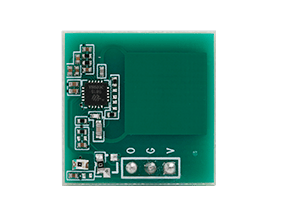
The AirTouch AT581x radar
(aka AT581x ) is a family of 5.8GHz radar which can be used for human presence detection. It can detect tiny movements
and compared to a PIR sensor it can detect presence continuously. This can be useful, for example, to turn
the lights on when you enter a room, keep them on as long as you are there (without waving your hands at the
sensor) and turn them off almost immediately after you leave the room.
They are ultra-low power (as low as 40µA of current consumption) and are extremely simple to use, yet can be setup by I2C. It’s installed in many low cost appliance, like the ESP32S3-BOX-3, and can be found by many different manufacturer or reference, like the MoreSense MS58-3909S68U4.
It is possible to use this sensor with only a single GPIO pin; however, if you wish to change its settings, a I2C component (and its requisite GPIO pins) is required in your device’s configuration.
# Example configuration entryat581x: id: "Radar" i2c_id: bus_aComponent/Hub
Section titled “Component/Hub”You need to have the hub component (at581x: entry) defined to be able to change the sensor’s
settings, get it listed as an motion entity or being able to turn on/off the radio frequency emmission.
A Gpio alone could be sufficient if you only want
to determine presence/occupancy. When you define at581x: you’ll need to have a i2c: entry in
your configuration with both the SDA and SCL pins defined.
Multiple instances of this component may be defined if multiple I2C components are available:
at581x: - id: mmWave_1 i2c_id: bus_a address: 0x28 - id: mmWave_2 i2c_id: bus_a address: 0x29 ...Configuration variables
Section titled “Configuration variables”-
id (Optional, ID): Manually specify the ID used for code generation. Necessary if you want to define multiple instances of this component.
-
i2c_id (Optional, ID): Manually specify the ID of the I2C if you want to use multiple I2C buses.
Binary Sensor (GPIO)
Section titled “Binary Sensor (GPIO)”The state of the radar detection is available via its GPIO pin. It’s required to use a GPIO binary sensor to monitor the motion status
binary_sensor: - platform: gpio name: "Human in front" pin: GPIOXX- Refer to other options from Binary Sensor and GPIO Binary Sensor.
Switch
Section titled “Switch”Switch components are used to enable/disable radio frequency hardware.
switch: - platform: at581x at581x_id: Radar name: "Enable Radar"Configuration variables
Section titled “Configuration variables”-
at581x_id (Optional, ID): The ID of the AT581x component defined above. Required when multiple instances of the
at581xcomponent are defined. -
All other options from Switch.
Actions
Section titled “Actions”at581x.settings Action
Section titled “at581x.settings Action”WARNING
The hardware frontend reset option is only required to reset the frontend in case it is struck, before sending the new configuration. However, a frontend reset is always performed after changing the settings.
The radar has several settings which can be changed. These settings are not saved in non-volatile memory and need to be set on each boot.
The settings action allows changing of any number of the radar’s internal parameters/settings. With this action, any unspecified parameters will remain unchanged.
on_...: - at581x.settings: id: "Waveradar" hw_frontend_reset: false frequency: 5800MHz sensing_distance: 200 # 0-1023 poweron_selfcheck_time: 2000ms protect_time: 1s trigger_base: 500ms trigger_keep: 10s stage_gain: 3 # 0-12 the higher the value the smaller the gain power_consumption: 70µAConfiguration variables
Section titled “Configuration variables”-
id (Optional, ID): Manually specify the ID of the sensor on which settings should be changed. If only one radar is defined, this is optional.
-
hw_frontend_reset (Optional, boolean): If set to true, a reset of the analog frontend will be performed before changing other options. Ignored if not set or set to
false. Upon applying the settings a frontend reset will be performed anyway, this is only useful if the sensor is not answering or locked up. -
frequency (Optional, enum): Any of the possible frequencies (5696, 5715, 5730, 5748, 5765, 5784, 5800, 5819, 5836, 5851, 5869, 5888) in MHz. Defaults to
5800MHz. -
sensing_distance (Optional, int): A unitless number, in range 0-1023, specifying the maximum distance to detect motion
-
poweron_selfcheck_time (Optional, int): The delay to perform self check and calibration on power on. Recommended not to change this
-
protect_time (Optional, int): The delay after an end-of-trigger event where the detection will not trigger anymore. Max 65535ms
-
trigger_base (Optional, int): The delay while a detection must be active to change the state of the sensor. Max 65535ms
-
trigger_keep (Optional, int): The delay that the output will stay high after a detection event. This is usually what you want to change.
-
stage_gain (Optional, int): The analog gain to use for threshold test. Any value in range 0-12, with 12 being the lowest gain and 0 the highest
-
power_consumption (Optional, int): Any of the possible power profile (48, 56, 63, 70, 77, 91, 105, 115, 40, 44, 47, 51, 54, 61, 68, 78) in µA
at581x.reset Action
Section titled “at581x.reset Action”Restart the sensor.
on_...: at581x.reset:Configuration variables
Section titled “Configuration variables”- id (Optional, ID): Manually specify the ID of the AT581x component. Useful when multiple instances of this component are defined.