

DF-Player mini
The dfplayer (datasheet), component
allows you to play sound and music stored in an SD card or USB flash drive.
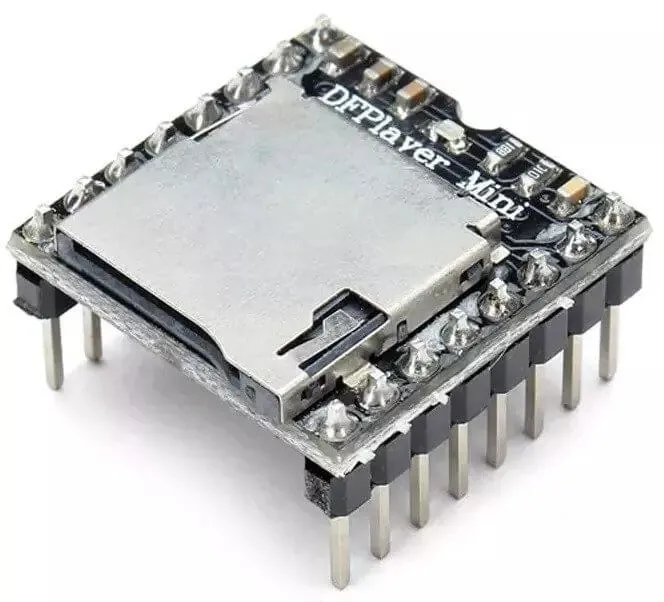
For this component to work you need to have set up a UART bus in your configuration.
Overview
Section titled “Overview”The module can be powered by the 3.3V output of a NodeMCU. For communication you can connect only
the tx_pin of the uart bus to the module’s RX but if you need feedback of playback active
you will also need to connect the rx_pin to the module’s TX.
For best quality audio a powered stereo speaker can be connected to the modules DAC_R,
DAC_L and GND, alternatively the module features a built-in 3W audio amplifier, in that case
the pins SPK_1 and SPK_2 should be connected to one passive speaker and a 5V 1A power supply
will be required.
# Example configuration entrydfplayer:Configuration variables
Section titled “Configuration variables”- uart_id (Optional, ID): Manually specify the ID of the UART hub.
- id (Optional, ID): Manually specify the ID used for code generation.
- on_finished_playback (Optional, Automation): An action to be performed when playback is finished.
dfplayer.is_playing Condition
Section titled “dfplayer.is_playing Condition”This Condition returns true while playback is active.
# In some trigger:on_...: if: condition: dfplayer.is_playing then: logger.log: 'Playback is active!'dfplayer.play_next Action
Section titled “dfplayer.play_next Action”Starts playback of next track or skips to the next track.
on_...: then: - dfplayer.play_next:dfplayer.play_previous Action
Section titled “dfplayer.play_previous Action”Plays the previously played track.
on_...: then: - dfplayer.play_previous:dfplayer.play Action
Section titled “dfplayer.play Action”Plays a track.
on_...: then: - dfplayer.play: file: 23 loop: false # Shorthand - dfplayer.play: 23Configuration options:
-
file (Optional, int, templatable): The global track number (from all tracks in the device). If not specified plays the first track.
-
loop (Optional, boolean, templatable): Repeats playing the same track. Defaults to
false.
dfplayer.play_mp3 Action
Section titled “dfplayer.play_mp3 Action”Plays a track inside the folder mp3. Files inside the folder must be numbered from 1
to 9999, like 0001.mp3, 0002.mp3, … etc.
The folder name needs to be mp3, placed under the SD card root directory, and the
mp3 file name needs to be 4 digits, for example, “0001.mp3”, placed under the mp3 folder.
If you want, you can add additional text after the number in the filename, for example,
0001hello.mp3, but must always be referenced by number only in yaml.
/mp3 /0001hello.mp3 /0002.mp3 /0003_thisistheway.mp3 ..on_...: then: - dfplayer.play_mp3: file: 1 # Shorthand - dfplayer.play_mp3: 1Configuration options:
- file (Required, int, templatable): The file number
inside the
mp3folder to play.
dfplayer.play_folder Action
Section titled “dfplayer.play_folder Action”Plays files inside numbered folders, folders must be numbered from 1 and with leading
zeros. Like 01, 02, … etc. Files inside the folders must be numbered with two
leading zeros, like 001.mp3, 002.mp3, … etc.
Folder numbers can range from 1 to 99 and file name from 1 to 255 or folder number
from 1 to 10 and file number from 1 to 1000.
/01 /001.mp3 /002.mp3 ../02 /001.mp3 /002.mp3 /003.mp3 ..on_...: then: - dfplayer.play_folder: folder: 2 file: 1Configuration options:
-
folder (Required, int, templatable): The folder number.
-
file (Optional, int, templatable): The file number inside the folder to play. Optional only if
loopis not set. -
loop (Optional, boolean, templatable): Repeats playing all files in the folder. Causes
fileto be ignored. Defaults tofalse.
dfplayer.set_device Action
Section titled “dfplayer.set_device Action”Changes the device in use. Valid values are TF_CARD and USB.
on_...: then: - dfplayer.set_device: TF_CARDdfplayer.set_volume Action
Section titled “dfplayer.set_volume Action”Changes volume.
on_...: then: - dfplayer.set_volume: volume: 20 # Shorthand - dfplayer.set_volume: 20Configuration options:
- volume (Required, int, templatable): The volume value.
Valid values goes from
0to30.
dfplayer.volume_up Action
Section titled “dfplayer.volume_up Action”Turn volume up.
on_...: then: - dfplayer.volume_updfplayer.volume_down Action
Section titled “dfplayer.volume_down Action”Turn volume down.
on_...: then: - dfplayer.volume_downdfplayer.set_eq Action
Section titled “dfplayer.set_eq Action”Changes audio equalization preset.
on_...: then: - dfplayer.set_eq: eq_preset: ROCK # Shorthand - dfplayer.set_eq: ROCKConfiguration options:
- eq_preset (Required): Eq Preset value. Valid values are
NORMAL,POP,ROCK,JAZZ,CLASSICandBASS.
dfplayer.sleep Action
Section titled “dfplayer.sleep Action”Enters sleep mode. Playback is stopped and the action dfplayer.set_device: TF_CARD should be
send for playback to be enabled again.
on_...: then: - dfplayer.sleepdfplayer.reset Action
Section titled “dfplayer.reset Action”Module reset.
on_...: then: - dfplayer.resetdfplayer.start Action
Section titled “dfplayer.start Action”Starts playing a track or resumes paused playback.
on_...: then: - dfplayer.startdfplayer.pause Action
Section titled “dfplayer.pause Action”Pauses playback, playback can be resumed from the same position with dfplayer.start.
on_...: then: - dfplayer.pausedfplayer.stop Action
Section titled “dfplayer.stop Action”Stops playback.
on_...: then: - dfplayer.stopdfplayer.random Action
Section titled “dfplayer.random Action”Randomly plays all tracks.
on_...: then: - dfplayer.randomAll actions
Section titled “All actions”- id (Optional, ID): Manually specify the ID of the DFPlayer if you have multiple components.
Test setup
Section titled “Test setup”With the following code you can quickly setup a node and use Home Assistant’s service in the developer tools.
E.g. for calling dfplayer.play_folder select the service esphome.test_node_dfplayer_play and in
service data enter
{ "file": 23 }Sample code
Section titled “Sample code”uart: tx_pin: GPIOXX rx_pin: GPIOXX baud_rate: 9600
dfplayer: on_finished_playback: then: logger.log: 'Playback finished event'
api: actions: - action: dfplayer_next then: - dfplayer.play_next: - action: dfplayer_previous then: - dfplayer.play_previous: - action: dfplayer_play variables: file: int then: - dfplayer.play: !lambda 'return file;' - action: dfplayer_play_loop variables: file: int loop_: bool then: - dfplayer.play: file: !lambda 'return file;' loop: !lambda 'return loop_;' - action: dfplayer_play_folder variables: folder: int file: int then: - dfplayer.play_folder: folder: !lambda 'return folder;' file: !lambda 'return file;'
- action: dfplayer_play_loop_folder variables: folder: int then: - dfplayer.play_folder: folder: !lambda 'return folder;' loop: true
- action: dfplayer_set_device_tf then: - dfplayer.set_device: TF_CARD
- action: dfplayer_set_device_usb then: - dfplayer.set_device: USB
- action: dfplayer_set_volume variables: volume: int then: - dfplayer.set_volume: !lambda 'return volume;' - action: dfplayer_set_eq variables: preset: int then: - dfplayer.set_eq: !lambda 'return static_cast<dfplayer::EqPreset>(preset);'
- action: dfplayer_sleep then: - dfplayer.sleep
- action: dfplayer_reset then: - dfplayer.reset
- action: dfplayer_start then: - dfplayer.start
- action: dfplayer_pause then: - dfplayer.pause
- action: dfplayer_stop then: - dfplayer.stop
- action: dfplayer_random then: - dfplayer.random
- action: dfplayer_volume_up then: - dfplayer.volume_up
- action: dfplayer_volume_down then: - dfplayer.volume_down