

RPI_DPI_RGB Display Driver
Models
Section titled “Models”This display driver supports displays with 16 bit parallel interfaces, often referred to as “RPI_DPI_RGB” type. These have a parallel interface but no SPI interface and require no configuration of the driver chip.
WARNING
This component has been made redundant since this class of displays is now supported by the Mipi Rgb This component will be removed in a future release.
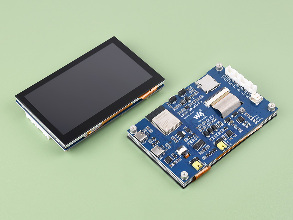
This driver has been tested with the following displays:
- Waveshare ESP32-S3-Touch-LCD-4.3
- Makerfabs 4.3” display (Sunton)
This component requires an ESP32 (usually an ESP32-S3 because of the number of GPIO pins required) and the use of ESP-IDF. PSRAM is a requirement due to the size of the display buffer.
# Example minimal configuration entrydisplay:  - platform: rpi_dpi_rgb    id: rpi_disp    dimensions:      width: 800      height: 480    de_pin: REPLACE_ME    hsync_pin: REPLACE_ME    vsync_pin: REPLACE_ME    pclk_pin: REPLACE_ME
    data_pins:      red:        - XX        #r1        - XX        #r2        - XX        #r3        - XX        #r4        - XX        #r5      green:        - XX        #g0        - XX        #g1        - XX        #g2        - XX        #g3        - XX        #g4        - XX        #g5      blue:        - XX        #b1        - XX        #b2        - XX        #b3        - XX        #b4        - XX        #b5
Configuration variables
Section titled “Configuration variables”-
data_pins (Required): A list of pins used for the databus. Specified in 3 groups:
- red (Required, Pin Schema): Exactly 5 pin numbers for the red databits, listed from least to most significant bit.
- green (Required, Pin Schema): Exactly 6 pin numbers for the green databits, listed from least to most significant bit.
- blue (Required, Pin Schema): Exactly 5 pin numbers for the blue databits, listed from least to most significant bit.
-
de_pin (Required, Pin Schema): The DE pin
-
pclk_pin (Required, Pin Schema): The PCLK pin.
-
hsync_pin (Required, Pin Schema): The Horizontal sync pin.
-
vsync_pin (Required, Pin Schema): The Vertical sync pin.
-
enable_pin (Optional, Pin Schema): The ENABLE pin.
-
reset_pin (Optional, Pin Schema): The RESET pin.
-
hsync_pulse_width (Optional, int): The horizontal sync pulse width.
-
hsync_front_porch (Optional, int): The horizontal front porch length.
-
hsync_back_porch (Optional, int): The horizontal back porch length.
-
vsync_pulse_width (Optional, int): The vertical sync pulse width.
-
vsync_front_porch (Optional, int): The vertical front porch length.
-
vsync_back_porch (Optional, int): The vertical back porch length.
-
update_interval (Optional, Time): The interval to re-draw the screen. Defaults to
5s. -
auto_clear_enabled (Optional, boolean): If the display should be cleared before each update. Defaults to
trueif a lambda or pages are configured, false otherwise. or to keep the existing display content (must overwrite explicitly, e.g., only on data change). -
pages (Optional, list): Show pages instead of a single lambda. See Display Pages.
-
id (Optional, ID): Manually specify the ID used for code generation.
-
color_order (Optional): Should be one of
bgr(default) orrgb. -
dimensions (Required): Dimensions of the screen, specified either as width x height (e.g
320x240) or with separate config keys.- height (Required, int): Specifies height of display in pixels.
- width (Required, int): Specifies width of display.
- offset_width (Optional, int): Specify an offset for the x-direction of the display, typically used when an LCD is smaller than the maximum supported by the driver chip. Default is 0
- offset_height (Optional, int): Specify an offset for the y-direction of the display. Default is 0.
-
pclk_frequency (Optional): Set the pixel clock speed. Default is 16MHz.
-
pclk_inverted (Optional, bool): If the pclk is active negative (default is True)
-
invert_colors (Optional): With this boolean option you can invert the display colors. Note some of the displays have this option set automatically to true and can’t be changed.
-
rotation (Optional): Rotate the display presentation in software. Choose one of
0°,90°,180°, or270°. -
lambda (Optional, lambda): The lambda to use for rendering the content on the display. See Display Rendering Engine for more information.
The horizontal and vertical pulse_width, front_porch and back_porch values are optional, but may require
changing for a specific display. Refer to the manufacturer’s sample code for suitable values. These specify timing
requirements for the display.
Example configurations
Section titled “Example configurations”Waveshare ESP32-S3 Touch 4.3
Section titled “Waveshare ESP32-S3 Touch 4.3”display: - platform: rpi_dpi_rgb color_order: RGB pclk_frequency: 16MHz dimensions: width: 800 height: 480 de_pin: number: 5 hsync_pin: number: 46 ignore_strapping_warning: true vsync_pin: number: 3 ignore_strapping_warning: true pclk_pin: 7 hsync_back_porch: 30 hsync_front_porch: 210 hsync_pulse_width: 30 vsync_back_porch: 4 vsync_front_porch: 4 vsync_pulse_width: 4 data_pins: red: - 1 #r3 - 2 #r4 - 42 #r5 - 41 #r6 - 40 #r7 blue: - 14 #b3 - 38 #b4 - 18 #b5 - 17 #b6 - 10 #b7 green: - 39 #g2 - 0 #g3 - 45 #g4 - 48 #g5 - 47 #g6 - 21 #g7Makerfabs 4.3” 800x480 display
Section titled “Makerfabs 4.3” 800x480 display”display: - platform: rpi_dpi_rgb update_interval: never id: rpi_display color_order: RGB rotation: 90 dimensions: width: 800 height: 480 de_pin: number: 40 hsync_pin: 39 vsync_pin: 41 pclk_pin: 42 data_pins: red: - 45 #r1 - 48 #r2 - 47 #r3 - 21 #r4 - 14 #r5 green: - 5 #g0 - 6 #g1 - 7 #g2 - 15 #g3 - 16 #g4 - 4 #g5 blue: - 8 #b1 - 3 #b2 - 46 #b3 - 9 #b4 - 1 #b5