

Grove TB6612FNG Motor Drive
The Grove TBB6612FNG a runs over I²C bus and has the capability to control DC and Stepper motors. At the current stage of implementation only DC motor is implemented.
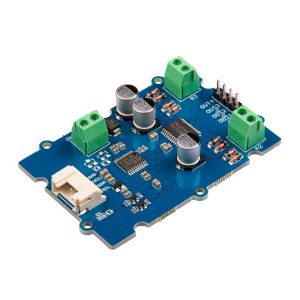
# Example configurationgrove_tb6612fng: - address: 0x14 id: test_motorConfiguration variables
Section titled “Configuration variables”- id (Required, ID): The id to use for this TB6612FNG component.
- address (Optional, int): The I²C address of the driver.
Defaults to
0x14.
.. grove_tb6612fng.run:
grove_tb6612fng.run Action
Section titled “grove_tb6612fng.run Action”Set the motor to spin by defining the direction and speed of the rotation, speed is a range from 0 to 255
on_...: then: - grove_tb6612fng.run: channel: 1 speed: 255 direction: BACKWARD id: test_motor.. grove_tb6612fng.stop:
grove_tb6612fng.stop Action
Section titled “grove_tb6612fng.stop Action”Set the motor to stop motion but wont stop to spin in case there is a force pulling down, you would want to use break action if this is your case
on_...: then: - grove_tb6612fng.stop: channel: 1.. grove_tb6612fng.break:
grove_tb6612fng.break Action
Section titled “grove_tb6612fng.break Action”Set the motor channel to be on break mode which it ensure the wheel wont spin even if forced or pushed
on_...: then: - grove_tb6612fng.break: channel: 1 id: test_motor.. grove_tb6612fng.standby:
grove_tb6612fng.standby Action
Section titled “grove_tb6612fng.standby Action”Set the board to be on standby when is not used for a long time which reduces power consumptions and any jerking motion when stationary
on_...: then: - grove_tb6612fng.standby id: test_motor.. grove_tb6612fng.no_standby:
grove_tb6612fng.no_standby Action
Section titled “grove_tb6612fng.no_standby Action”Set the board to be awake, every esphome is restarted the default mode is set to standby to ensure the motor wont spin accidentally
on_...: then: - grove_tb6612fng.no_standby id: test_motor.. grove_tb6612fng.change_address:
grove_tb6612fng.change_address Action
Section titled “grove_tb6612fng.change_address Action”If you require connecting multiple boards at once, the address can be changed using this action. The address can be changed to a value in the range of 0x01 - 0x7f inclusive.
on_...: then: - grove_tb6612fng.change_address: address: 0x15 id: test_motor