

Matrix keypad
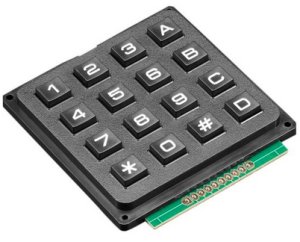
The matrix_keypad component allows you to integrate pads which
have the keys connected at the intersection points of the rows and columns
of a matrix.
Component/Hub
Section titled “Component/Hub”# Example configuration entrymatrix_keypad: id: mykeypad rows: - pin: GPIOXX - pin: GPIOXX - pin: GPIOXX - pin: GPIOXX columns: - pin: GPIOXX - pin: GPIOXX - pin: GPIOXX - pin: GPIOXX keys: "123A456B789C*0#D" has_diodes: false on_key: - lambda: ESP_LOGI("KEY", "key %d pressed", x);Configuration variables
Section titled “Configuration variables”-
id (Optional, ID): Set the ID of this device for use in lambdas.
-
rows (Required, list): A list of pins where the horrizontal matrix lines are connected, in order from top to bottom. These pins need to be output capable.
-
columns (Required, list): A list of pins where the vertical matrix lines are connected, in order from left to right. These pins need to be input capable with pullups enabled. If there is no internal pullup, then an external one is required.
-
keys (Optional, string): The keys present on the matrix, from top left to bottom right, row by row. Required for
key_collectorandbinary_sensor(if using key selection). -
has_diodes (Optional, boolean): For pads where row pins are outputs, and the keys are connected with diodes. Defaults to
false. -
has_pulldowns (Optional, boolean): For pads where the column lines have external pulldowns. Defaults to
false.
Binary Sensor
Section titled “Binary Sensor”Individual keys can be added independently to ESPHome as binary_sensor :
# Example configuration entrybinary_sensor: - platform: matrix_keypad keypad_id: mykeypad id: key4 row: 1 col: 0 - platform: matrix_keypad id: keyA key: AConfiguration variables
Section titled “Configuration variables”- keypad_id (Optional, ID): The ID of the keypad to process keypresses from.
- id (Optional, ID): Set the ID of this key for use in lambdas.
- row (Optional, integer): The row of the key.
- col (Optional, integer): The column of the key.
- key (Optional, string): The key from
keysconfiguration entry above. - All other options from Binary Sensor.
Either the row and col parameters, or the key parameter has to be provided.
Automations
Section titled “Automations”-
on_key (Optional, Automation): An automation to perform when a key has been pressed. The key is in a variable called
x.NOTE
Automatic handling of multiple keys (e.g. PIN code entry) is possible with the the Key Collector component.