

RF Bridge Component
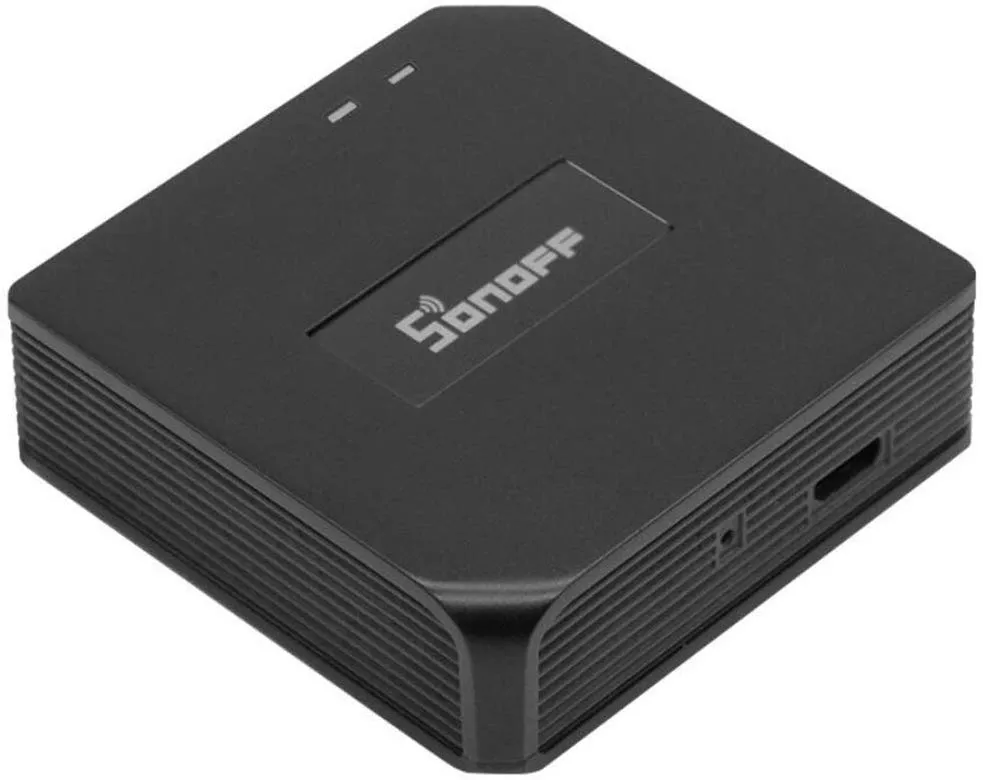
The RF Bridge component provides the ability to send and receive 433MHz signals (like RF remotes/key fobs) using radio microcontrollers found on RF bridge devices ( eg., Sonoff RF Bridge).
- The black Sonoff RF Bridge (R1, R2 V1.0) has an ESP8266 (for WIFI/ESPHome) and an embedded EFM8BB1 microcontroller (433 MHz).
- The white Sonoff RF Bridge (R2 V2.0) has ESP8266 and an embedded OB38S003 microcontroller (433 MHz).
This component implements a communication protocol between the ESP8266 and the firmware of EFM8BB1 or OB38S003.
The radio microcontroller is connected to the ESP8266 via the
UART bus. The uart bus must be configured at the same speed of the module
which is 19200bps.
WARNING
If you are using the Logger make sure you disable the uart logging with the
baud_rate: 0 option.
# Example configuration entryrf_bridge: on_code_received: - homeassistant.event: event: esphome.rf_code_received data: sync: !lambda 'char buf[5]; return format_hex_to(buf, data.sync);' low: !lambda 'char buf[5]; return format_hex_to(buf, data.low);' high: !lambda 'char buf[5]; return format_hex_to(buf, data.high);' code: !lambda 'char buf[9]; return format_hex_to(buf, data.code);'Configuration variables
Section titled “Configuration variables”- id (Optional, ID): Manually specify the ID of the RF bridge.
- uart_id (Optional, ID): Manually specify the ID of the UART hub that the bridge component uses.
- on_code_received (Optional, Automation): An action to be
performed when a code is received. See
on_code_receivedTrigger.
on_code_received Trigger
Section titled “on_code_received Trigger”With this configuration option you can write complex automations whenever a code is
received by the bridge. To use the code, use a lambda template.
The code and the corresponding protocol timings are available inside that lambda under the
variables named code, sync, high and low.
on_code_received: - homeassistant.event: event: esphome.rf_code_received data: sync: !lambda 'char buf[5]; return format_hex_to(buf, data.sync);' low: !lambda 'char buf[5]; return format_hex_to(buf, data.low);' high: !lambda 'char buf[5]; return format_hex_to(buf, data.high);' code: !lambda 'char buf[9]; return format_hex_to(buf, data.code);'rf_bridge.send_code Action
Section titled “rf_bridge.send_code Action”Send a standard (0xA5) RF code using this action in automations.
on_...: then: - rf_bridge.send_code: sync: 0x700 low: 0x800 high: 0x1000 code: 0xABC123Configuration options:
- sync (Required, int, templatable): RF Sync timing
- low (Required, int, templatable): RF Low timing
- high (Required, int, templatable): RF high timing
- code (Required, int, templatable): RF code
- id (Optional, ID): Manually specify the ID of the RF Bridge if you have multiple bridges or multiple bridge components.
NOTE
This action can also be written in lambdas:
id(my_rf_bridge).send_code(0x700, 0x800, 0x1000, 0xABC123);rf_bridge.beep Action
Section titled “rf_bridge.beep Action”Activate the internal buzzer to make a beep.
on_...: then: - rf_bridge.beep: duration: 100Configuration options:
- duration (Required, int, templatable): beep duration in milliseconds.
- id (Optional, ID): Manually specify the ID of the RF Bridge if you have multiple components.
rf_bridge.learn Action
Section titled “rf_bridge.learn Action”Tell the RF Bridge to learn new protocol timings using this action in automations.
A new code with timings will be returned to on_code_received Trigger
on_...: then: - rf_bridge.learnConfiguration options:
- id (Optional, ID): Manually specify the ID of the RF Bridge if you have multiple components.
rf_bridge.send_raw Action
Section titled “rf_bridge.send_raw Action”Send a raw command to the onboard radio chip. The OEM RF firmware is able to raw send only standard signals (usually short), for other signals (B0 transmit), flashing the RF chip with Portisch or Mightymos firmware is needed.
This can be used to send raw RF codes in automations, mainly for protocols that are not supported.
If you have Portisch or Mightymos firmware installed, these raw codes can be obtained with the help of rf_bridge.start_bucket_sniffing Action
on_...: then: - rf_bridge.send_raw: # in OEM firmware raw: 'AAA5070008001000ABC12355' - rf_bridge.send_raw: # in Portisch firmware raw: 'AAB04C0408137702440111139B38192A192A1A1A19292A192A1A19292929292A1A1A1A1A192A19292A1A192A192A1A1A1A1A1A1A1A192A1A1A1A1A1A1A1A1A1A1A1A192A1929292A192A1A1929292955'Configuration options:
- raw (Required, string, templatable): RF raw string
- id (Optional, ID): Manually specify the ID of the RF Bridge if you have multiple components.
NOTE
This action can also be written in lambdas:
id(my_rf_bridge).send_raw("AAA5070008001000ABC12355");Portisch firmware
Section titled “Portisch firmware”The radio microcontroller (MCU) can be flashed with an alternative firmware which allows for sniffing and transmitting advanced protocols (e.g raw, 0xB0, 0xB1, 0xA8) in addition to the standard receive/transmit (0xA4,0xA5). If you have flashed the secondary MCU with the Portisch firmware or Mightymos firmware, ESPHome is able to receive the extra protocols that can be decoded as well as activate the other modes supported. The below Triggers/actions are only for Portisch firmware. You can see a list of available commands and format in the Portisch Wiki
on_advanced_code_received Trigger
Section titled “on_advanced_code_received Trigger”Similar to on_code_received Trigger, this trigger receives the codes after advanced sniffing is started.
To use the code, use a lambda template, the code and the corresponding protocol and length
are available inside that lambda under the variables named code, protocol and length.
on_advanced_code_received: - homeassistant.event: event: esphome.rf_advanced_code_received data: length: !lambda 'char buf[3]; return format_hex_to(buf, data.length);' protocol: !lambda 'char buf[3]; return format_hex_to(buf, data.protocol);' code: !lambda 'return data.code;'rf_bridge.send_advanced_code Action
Section titled “rf_bridge.send_advanced_code Action”Send an RF code using this action in automations.
on_...: then: - rf_bridge.send_advanced_code: length: 0x04 protocol: 0x01 code: "ABC123"Configuration options:
- length (Required, int, templatable): Length of code plus protocol
- protocol (Required, int, templatable): RF Protocol
- code (Required, string, templatable): RF code
- id (Optional, ID): Manually specify the ID of the RF Bridge if you have multiple components.
NOTE
This action can also be written in lambdas:
id(my_rf_bridge).send_advanced_code({0x04, 0x01, "ABC123"});rf_bridge.start_advanced_sniffing Action
Section titled “rf_bridge.start_advanced_sniffing Action”Tell the RF Bridge to listen for the advanced/extra protocols defined in the portisch firmware.
The decoded codes with length and protocol will be returned to on_advanced_code_received Trigger
on_...: then: - rf_bridge.start_advanced_sniffingConfiguration options:
- id (Optional, ID): Manually specify the ID of the RF Bridge if you have multiple components.
rf_bridge.stop_advanced_sniffing Action
Section titled “rf_bridge.stop_advanced_sniffing Action”Tell the RF Bridge to stop listening for the advanced/extra protocols defined in the portisch firmware.
on_...: then: - rf_bridge.stop_advanced_sniffingConfiguration options:
- id (Optional, ID): Manually specify the ID of the RF Bridge if you have multiple components.
rf_bridge.start_bucket_sniffing Action
Section titled “rf_bridge.start_bucket_sniffing Action”Tell the RF Bridge to dump raw sniffing data. Useful for getting codes for unsupported protocols.
The raw data will be available in the log and can later be used with rf_bridge.send_raw Action action.
NOTE
A conversion from B1 (received) raw format to B0 (send) raw command format should be applied. For this, you can use the tool B1 Converter
NOTE
There seems to be an overflow problem in Portisch firmware and after a short while, the bucket sniffing stops. You should re-call the action to reset and start sniffing again. This issue is fixed in Mightymos firmware.
on_...: then: - rf_bridge.start_bucket_sniffingConfiguration options:
- id (Optional, ID): Manually specify the ID of the RF Bridge if you have multiple components.
Reset radio
Section titled “Reset radio”For Portisch or Mightymos firmware
- rf_bridge.send_raw: raw: 'AAFE55'Getting started with Home Assistant
Section titled “Getting started with Home Assistant”The following code will get you up and running with a configuration sending codes to Home Assistant as events and will also setup a service so you can send codes with your RF Bridge.
uart:  tx_pin: 1  rx_pin: 3  baud_rate: 19200
logger:  baud_rate: 0
api:  actions:  # create actions in HA    # Send standard RF using integer values    - action: send_rf_code      variables:        sync: int        low: int        high: int        code: int      then:        - rf_bridge.send_code:            sync: !lambda 'return sync;'            low: !lambda 'return low;'            high: !lambda 'return high;'            code: !lambda 'return code;'
    # send raw RF    - action: send_rf_code_raw      variables:        raw: string      then:        - rf_bridge.send_raw:            raw: !lambda 'return raw;'
    - action: learn      then:        - rf_bridge.learn
rf_bridge:  on_code_received:  # all firmwares, can be reported as integer, hex, or both, as desired.    then:      - homeassistant.event:          event: esphome.rf_code_received          data:            sync: !lambda 'char buf[5]; return format_hex_to(buf, data.sync);'            low: !lambda 'char buf[5]; return format_hex_to(buf, data.low);'            high: !lambda 'char buf[5]; return format_hex_to(buf, data.high);'            code: !lambda 'char buf[9]; return format_hex_to(buf, data.code);'
    - homeassistant.event:          event: esphome.rf_code_received          data:            sync: !lambda 'return data.sync;'            low: !lambda 'return data.low;'            high: !lambda 'return data.high;'            code: !lambda 'return data.code;'
  on_advanced_code_received:  # only on Portisch or mightymos firmwares    then:      - homeassistant.event:          event: esphome.rf_advanced_code_received          data:            length: !lambda 'char buf[3]; return format_hex_to(buf, data.length);'            protocol: !lambda 'char buf[3]; return format_hex_to(buf, data.protocol);'            code: !lambda 'return data.code;'
Now your latest received code will be in an event.
To trigger the automation from Home Assistant you can invoke the service/action with this code:
automation: # ... action: - action: esphome.rf_bridge_send_rf_code data: sync: 0x700 low: 0x800 high: 0x1000 code: 0xABC123Additional example configurations in ESPHome
button:  - platform: template    name: Advanced sniffing start    on_press:      then:        - rf_bridge.start_advanced_sniffing
  - platform: template    name: Advanced sniffing stop    on_press:      then:        - rf_bridge.stop_advanced_sniffing
  - platform: template    name: Bucket sniffing start    on_press:      then:        - rf_bridge.start_bucket_sniffing
  - platform: template    name: Beep    on_press:      then:        - rf_bridge.beep:            duration: 100
  - platform: template    name: Restart Radio    id: mcu_reset    on_press:      then:      - rf_bridge.send_raw:          raw: 'AAFE55'
switch:  - platform: template    name: "example LED strip"    optimistic: true    turn_on_action:      - rf_bridge.send_code:          sync: 0x2F4A          low: 0x0166          high: 0x0483          code: 0x00C301    turn_off_action:      - rf_bridge.send_code:          sync: 0x2F1A          low: 0x0184          high: 0x048C          code: 0x00C303
# example window blinds using Bitbucket sending.# Works on Portisch/mightymos firmware only.cover:  - platform: time_based    name: "Window blinds"    device_class: blind    open_action:      - rf_bridge.send_raw:          raw: 'AAB04C0408137702440111139B38192A192A1A1A19292A192A1A19292929292A1A1A1A1A192A19292A1A192A192A1A1A1A1A1A1A1A192A1A1A1A1A1A1A1A1A1A1A1A192A1929292A192A1A1929292955'    open_duration: 26.26s    close_action:      - rf_bridge.send_raw:          raw: 'AAB04C0408137E0249010E139C38192A192A1A1A19292A192A1A19292929292A1A1A1A1A192A19292A1A192A192A1A1A1A1A1A1A1A192A1A1A1A1A1A1A1A1A192A1A1A1A192929292A19292929292955'    close_duration: 25.99s    stop_action:      - rf_bridge.send_raw:          raw: 'AAB04C0408137502490111139F38192A192A1A1A19292A192A1A19292929292A1A1A1A1A192A19292A1A192A192A1A1A1A1A1A1A1A192A1A1A1A1A1A1A1A1A1A192A1A1A1929292A1929292929292955'
    has_built_in_endstop: true    assumed_state: false