

RTTTL Buzzer
The rtttl component allows you to easily connect a passive piezo buzzer to your microcontroller
and play monophonic songs. It accepts the Ring Tone Text Transfer Language, RTTTL format
(Wikipedia) which allows to store simple melodies.
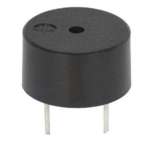
Overview Using a Passive Buzzer
Section titled “Overview Using a Passive Buzzer”It’s important that your buzzer is a passive one, if it beeps when you feed it with 3.3V then it is not a passive one and this library will not work properly.
The tone generator needs a PWM-capable output to work with, currently only the ESP8266 Software PWM Output and ESP32 LEDC Output are supported.
# Example configuration entryoutput:  - platform: ...    id: rtttl_out    ...
rtttl:  output: rtttl_out  id: my_rtttl  gain: 60%
Overview Using a Speaker
Section titled “Overview Using a Speaker”The tone generator can instead be used with a Speaker to output the audio.
# Example configuration entryspeaker:  - platform: ...    id: my_speaker    ...
rtttl:  speaker: my_speaker  id: my_rtttl  gain: 0.8
Configuration Variables
Section titled “Configuration Variables”-
output (Exclusive, ID): The id of the float output to use for this buzzer.
-
speaker (Exclusive, ID): The id of the Speaker to play the song on.
-
id (Optional, ID): Manually specify the ID used for code generation.
-
gain (Optional, Percentage): With this value you can set the volume of the sound.
-
on_finished_playback (Optional, Automation): An action to be performed when playback is finished.
NOTE
You can only use the output or speaker variable, not both at the same time.
All Actions and Conditions
Section titled “All Actions and Conditions”- id (Optional, ID): Manually specify the ID of the RTTTL if you have multiple components.
rtttl.play Action
Section titled “rtttl.play Action”Plays an RTTTL tone.
on_...: then: - rtttl.play: 'siren:d=8,o=5,b=100:d,e,d,e,d,e,d,e'Configuration options:
- rtttl (Required, string, templatable): The RTTTL string.
NOTE
If a melody is currently playing, you must call the rtttl.stop action before starting a new melody.
You can find many RTTTL strings online on the web. You can test melodies using the RTTTL Online Player before adding them to your configuration. See the format description below for details.
rtttl.stop Action
Section titled “rtttl.stop Action”Stops playback.
on_...: then: - rtttl.stoprtttl.is_playing Condition
Section titled “rtttl.is_playing Condition”This Condition returns true while playback is active.
# In some trigger:on_...: if: condition: rtttl.is_playing then: logger.log: 'Playback is active!'RTTTL Format
Section titled “RTTTL Format”An RTTTL string consists of three parts separated by colons (:):
name:d=4,o=5,b=120:notes- Name: A short identifier for the melody (max 10 characters)
- Control Parameters: Control section with
d,o, andbparameters - Notes: The actual melody encoded as note data
Control Parameters
Section titled “Control Parameters”- d (duration): The default note duration. Valid values are 1 (whole note), 2 (half note), 4 (quarter note), 8 (eighth note), 16 (sixteenth note), and 32 (thirty-second note). Default is 4.
- o (octave): The default octave for notes. Valid values are 4, 5, 6, or 7. Higher values produce higher-pitched sounds. Default is 6.
- b (beats): The tempo in beats per minute (BPM). Determines how fast the melody plays. Default is 63.
Note Format
Section titled “Note Format”Each note in the melody follows this pattern: [duration][note][#][octave][.]
- duration (optional): Overrides the default duration (1, 2, 4, 8, 16, 32)
- note: The note name:
c,d,e,f,g,a,b, orpfor pause - # (optional): Sharp modifier, raises the note by a half step
- octave (optional): Overrides the default octave (4-7)
- . (dot) (optional): Dotted note, extends duration by 50%
Examples
Section titled “Examples”8e6- Eighth note E in octave 64c#5- Quarter note C-sharp in octave 52g.- Dotted half note G in the default octave4c#5.- Dotted quarter note C-sharp in octave 516p- Sixteenth note pause
Tip: You can experiment with the control values to change how a song sounds. For example, increasing b makes the song play faster, while changing o shifts the pitch higher or lower.
Common Beeps
Section titled “Common Beeps”You can do your own beep patterns too! Here’s a short collection so you can just use right away or tweak them to your like:
two_short:d=4,o=5,b=100:16e6,16e6long:d=1,o=5,b=100:e6siren:d=8,o=5,b=100:d,e,d,e,d,e,d,escale_up:d=32,o=5,b=100:c,c#,d#,e,f#,g#,a#,bstar_wars:d=16,o=5,b=100:4e,4e,4e,8c,p,g,4e,8c,p,g,4e,4p,4b,4b,4b,8c6,p,g,4d#,8c,p,g,4e,8pmission_imp:d=16,o=6,b=95:32d,32d#,32d,32d#,32d,32d#,32d,32d#,32d,32d,32d#,32e,32f,32f#,32g,g,8p,g,8p,a#,p,c7,p,g,8p,g,8p,f,p,f#,p,g,8p,g,8p,a#,p,c7,p,g,8p,g,8p,f,p,f#,p,a#,g,2d,32p,a#,g,2c#,32p,a#,g,2c,a#5,8c,2p,32p,a#5,g5,2f#,32p,a#5,g5,2f,32p,a#5,g5,2e,d#,8dmario:d=4,o=5,b=100:16e6,16e6,32p,8e6,16c6,8e6,8g6,8p,8g,8p,8c6,16p,8g,16p,8e,16p,8a,8b,16a#,8a,16g.,16e6,16g6,8a6,16f6,8g6,8e6,16c6,16d6,8b,16p,8c6,16p,8g,16p,8e,16p,8a,8b,16a#,8a,16g.,16e6,16g6,8a6,16f6,8g6,8e6,16c6,16d6,8b,8p,16g6,16f#6,16f6,16d#6,16p,16e6,16p,16g#,16a,16c6,16p,16a,16c6,16d6,8p,16g6,16f#6,16f6,16d#6,16p,16e6,16p,16c7,16p,16c7,16c7,p,16g6,16f#6,16f6,16d#6,16p,16e6,16p,16g#,16a,16c6,16p,16a,16c6,16d6,8p,16d#6,8p,16d6,8p,16c6Test Setup
Section titled “Test Setup”With the following code you can quickly setup a node and use Home Assistant’s service in the developer tools.
E.g. for calling rtttl.play select the service esphome.test_esp8266_rtttl_play and in service data enter
song_str: 'scale_up:d=32,o=5,b=100:c,c#,d#,e,f#,g#,a#,b'Sample code
Section titled “Sample code”esphome: name: test_esp8266
esp8266: board: nodemcuv2
wifi: ssid: !secret wifi_ssid password: !secret wifi_password
output: - platform: esp8266_pwm pin: GPIOXX id: rtttl_out
rtttl: output: rtttl_out on_finished_playback: - logger.log: 'Song ended!'
api: actions: - action: rtttl_play variables: song_str: string then: - rtttl.play: rtttl: !lambda 'return song_str;'