

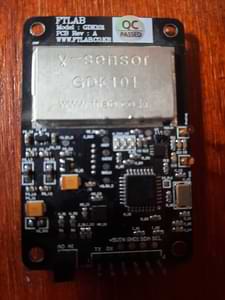
FTLab GDK101 Gamma Radiation Sensor Module
The GDK101 sensor platform allows you to use your GDK101 sensor to monitor radiation levels at your place.
The GDK101 can measure average dose rate per 1 and 10 minutes, it also detect vibrations that can disturb the measurement.
The GDK101 requires setting up I²C for data communication.
Module Pins
Section titled “Module Pins”| Module Pin | Description |
|---|---|
| TX | UART TX pin |
| RX | UART RX pin |
| +5VIN | Positive supply voltage |
| GND1 | Ground |
| SDA | I²C data bus |
| SCL | I²C clock bus |
| A0 | Address Jumper 1 |
| A1 | Address Jumper 2 |
| I2C Address | Jumpers State |
|---|---|
| 0x18 | A0 Short, A1 Short |
| 0x19 | A0 Open, A1 Short |
| 0x1A | A0 Short, A1 Open |
| 0x1B | A0 Open, A1 Open |
Component/Hub
Section titled “Component/Hub”# Example configuration entrygdk101: i2c_id: bus_a address: 0x18 update_interval: 10s-
address (Optional, int): Manually specify the I²C address of the sensor. Defaults to
0x18(A0andA1shorted). The address is made up using the state ofA0as bit 1 and the state ofA1as bit 2, so a total of four addresses is possible. -
update_interval (Optional, int): Manually defined update interval of sensor. Defaults to 60s.
-
i2c_id (Optional, string): Optional name of the bus.
Sensor
Section titled “Sensor”# Example configuration entrysensor: - platform: gdk101 radiation_dose_per_1m: name: "GDK101 Radiation Dose @ 1 min" radiation_dose_per_10m: name: "GDK101 Radiation Dose @ 10 min" status: name: "GDK101 Status" measurement_duration: name: "GDK101 Measuring Time"A sensor platform to radiation data
Configuration variables:
-
radiation_dose_per_1m (Optional): Radiation average dose per 1 minute. All options from Sensor.
-
radiation_dose_per_10m (Optional): Radiation average dose per 10 minutes. All options from Sensor.
-
status (Optional): Sensor status. All options from Sensor.
-
measurement_duration (Optional): Total time of measurement. All options from Sensor.
Binary Sensor
Section titled “Binary Sensor”# Example configuration entrybinary_sensor: - platform: gdk101 vibrations: name: "GDK101 Vibrations"Binary sensor that indicates if measurement was disturbed by vibrations.
Configuration variables:
- vibrations (Required): Vibration status. All options from Binary Sensor.
Text Sensor
Section titled “Text Sensor”# Example configuration entrytext_sensor: - platform: gdk101 version: name: "GDK101 FW Version"Text sensor that reports firmware version of the sensor.
Configuration variables:
- version (Required): Firmware version of the module. All options from Text Sensor.
Sensor Status
Section titled “Sensor Status”Sensor status indicates how long the sensor has been working, which indicates the accuracy of the measurements.
| Status | Description |
|---|---|
| 0 | Power On ~ 10sec |
| 1 | 10sec to 10min |
| 2 | After 10 min |
This can be represented by a template text sensor such as below:
sensor:  - platform: gdk101    status:      name: "GDK101 status"      id: gdk101_status
text_sensor:  - platform: template    name: "GDK101 Status Description"    lambda: |-      int status = int(id(gdk101_status).state);      if (status == 0) {        return {"Powered On"};      } else if (status == 1) {        return {"Settling"};      } else if (status == 2) {        return {"Settled"};      } else {        return {"Unknown status"};      }