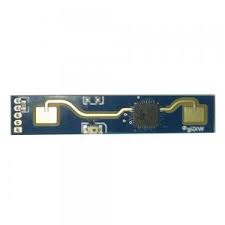
LD2410 Sensor
Component/Hub
Section titled “Component/Hub”The ld2410 sensor platform allows you to use HI-LINK LD2410 motion and presence sensors with ESPHome.
There are three variants with similar communication protocols:
- LD2410 (datasheet and user manual)
- LD2410B (datasheet and user manual)
- LD2410C (datasheet and user manual)
The UART is required to be set up in your configuration for this sensor to work, parity and
stop_bits must be respectively NONE and 1.
Use of hardware UART pins is highly recommended to best support the out-of-the-box 256000 baud rate of the sensor.
# Example configuration entryld2410:Configuration variables
Section titled “Configuration variables”-
uart_id (Optional, ID): Manually specify the ID of the UART Component if you want to use multiple UART buses.
-
id (Optional, ID): Manually specify the ID for this Ld2410 component if you need multiple components.
Binary Sensor
Section titled “Binary Sensor”The ld2410 binary sensors allow you to quickly determine various states reported by the sensor.
binary_sensor: - platform: ld2410 has_target: name: Presence has_moving_target: name: Moving Target has_still_target: name: Still Target out_pin_presence_status: name: Out pin presence statusConfiguration variables
Section titled “Configuration variables”-
has_target (Optional): If true target detect either still or in movement. All options from Binary Sensor.
-
has_moving_target (Optional): If true a moving target is detected. All options from Binary Sensor.
-
has_still_target (Optional): If true a still target is detected. All options from Binary Sensor.
-
out_pin_presence_status (Optional): When in engineering mode, indicates the status of the OUT pin, otherwise
false. OUT pin indication depends on the light function configuration. Might need to update to the latest firmware to use this. All options from Binary Sensor. -
ld2410_id (Optional, ID): Manually specify the ID for the Ld2410 component if you are using multiple components.
NOTE
By default, each of the Binary Sensor components above includes the following filter by default to prevent flooding Home Assistant with state updates:
- settle: 1000msIf you have defined other filters, this default will be overridden; you may of course add it back to your custom filter(s) as above if you wish.
To remove the default filter for any given binary sensor instance, add filters: [] to its configuration.
Sensor
Section titled “Sensor”The ld2410 sensors allow reporting of various measurements the sensor takes.
sensor: - platform: ld2410 light: name: Light moving_distance: name: Moving Distance still_distance: name: Still Distance moving_energy: name: Move Energy still_energy: name: Still Energy detection_distance: name: Detection Distance g0: move_energy: name: G0 move energy still_energy: name: G0 still energy g1: move_energy: name: G1 move energy still_energy: name: G1 still energy g2: move_energy: name: G2 move energy still_energy: name: G2 still energy g3: move_energy: name: G3 move energy still_energy: name: G3 still energy g4: move_energy: name: G4 move energy still_energy: name: G4 still energy g5: move_energy: name: G5 move energy still_energy: name: G5 still energy g6: move_energy: name: G6 move energy still_energy: name: G6 still energy g7: move_energy: name: G7 move energy still_energy: name: G7 still energy g8: move_energy: name: G8 move energy still_energy: name: G8 still energyConfiguration variables
Section titled “Configuration variables”-
light (Optional, int): When in engineering mode, indicates the light sensitivity, otherwise
unknown. Value between0and255inclusive. All options from Sensor. -
moving_distance (Optional, int): Distance in cm of detected moving target. All options from Sensor.
-
still_distance (Optional, int): Distance in cm of detected still target. All options from Sensor.
-
moving_energy (Optional, int): Energy for moving target. Value between
0and100inclusive. All options from Sensor. -
still_energy (Optional, int): Energy for still target. Value between
0and100inclusive. All options from Sensor. -
detection_distance (Optional, int): Distance in cm of target. All options from Sensor.
-
gX (Optional): Energies for the Xth gate (X => 0 to 8).
-
move_energy (Optional, int): When in engineering mode, the move energy of
the gate, otherwise
unknown. Value between0and100inclusive. All options from Sensor. -
still_energy (Optional, int): When in engineering mode, the still energy of
the gate, otherwise
unknown. Value between0and100inclusive. All options from Sensor.
-
-
ld2410_id (Optional, ID): Manually specify the ID for the Ld2410 component if you are using multiple components.
NOTE
By default, each of the Sensor components above includes the following filter by default to prevent flooding Home Assistant with state updates:
- throttle_with_priority: 1000msIf you have defined other filters, this default will be overridden; you may of course add it back to your custom filter(s) as above if you wish.
To remove the default filter for any given sensor instance, add filters: [] to its configuration.
Switch
Section titled “Switch”The ld2410 switches allow you to enable or disable sensor features from the front end.
switch: - platform: ld2410 engineering_mode: name: Engineering mode bluetooth: name: Control bluetoothConfiguration variables
Section titled “Configuration variables”-
engineering_mode (Optional): enable/disable engineering mode. Note that this requires more resources and is not recommended to be enabled when not necessary. All options from Switch.
-
bluetooth (Optional): Turn on/off the bluetooth adapter. Defaults to
true. All options from Switch. -
ld2410_id (Optional, ID): Manually specify the ID for the Ld2410 component if you are using multiple components.
Number
Section titled “Number”The ld2410 number allows you to control the configuration of your Ld2410.
number: - platform: ld2410 timeout: name: Timeout light_threshold: name: Light threshold max_move_distance_gate: name: Max move distance gate max_still_distance_gate: name: Max still distance gate g0: move_threshold: name: G0 move threshold still_threshold: name: G0 still threshold g1: move_threshold: name: G1 move threshold still_threshold: name: G1 still threshold g2: move_threshold: name: G2 move threshold still_threshold: name: G2 still threshold g3: move_threshold: name: G3 move threshold still_threshold: name: G3 still threshold g4: move_threshold: name: G4 move threshold still_threshold: name: G4 still threshold g5: move_threshold: name: G5 move threshold still_threshold: name: G5 still threshold g6: move_threshold: name: G6 move threshold still_threshold: name: G6 still threshold g7: move_threshold: name: G7 move threshold still_threshold: name: G7 still threshold g8: move_threshold: name: G8 move threshold still_threshold: name: G8 still thresholdConfiguration variables
Section titled “Configuration variables”-
timeout (Optional, int): Time in seconds during which presence state will stay present after leaving. Defaults to
5sAll options from Number. -
light_threshold (Optional, int): Sets the light threshold for the light function. Value between
0and255inclusive. Defaults to128. All options from Number. -
max_move_distance_gate (Optional, int): Maximum distance gate for movement detection. Value between
2and8inclusive. Defaults to8. All options from Number. -
max_still_distance_gate (Optional, int): Maximum distance gate for still detection. Value between
2and8inclusive. Defaults to8. All options from Number. -
gX (Optional): Thresholds for the Xth gate (X => 0 to 8).
-
move_threshold (Required, int): Threshold for the gate for motion detection.
Above this level for the considered gate (distance), movement detection will be triggered. Value between
0and100inclusive. See default values below. All options from Number. -
still_threshold (Required, int): Threshold for the gate for still detection.
Above this level for the considered gate (distance), still detection will be triggered. Value between
0and100inclusive. See default values below. All options from Number.
-
-
ld2410_id (Optional, ID): Manually specify the ID for the Ld2410 component if you are using multiple components.
Default values for gate threshold
Section titled “Default values for gate threshold”| Gate | Default Move threshold | Default Still threshold |
|---|---|---|
| 0 | 50 | 0 |
| 1 | 50 | 0 |
| 2 | 40 | 40 |
| 3 | 30 | 40 |
| 4 | 20 | 30 |
| 5 | 15 | 30 |
| 6 | 15 | 20 |
| 7 | 15 | 20 |
| 8 | 15 | 20 |
Button
Section titled “Button”The ld2410 button allows you to perform actions on your sensor.
button: - platform: ld2410 factory_reset: name: Factory reset restart: name: Restart query_params: name: Query paramsConfiguration variables
Section titled “Configuration variables”-
factory_reset (Optional): This command is used to restore all configuration values to their original values. All options from Button.
-
restart (Optional): Restart the device. All options from Button.
-
query_params (Optional): Refresh all sensors values of the device. All options from Button.
-
ld2410_id (Optional, ID): Manually specify the ID for the Ld2410 component if you are using multiple components.
Text Sensor
Section titled “Text Sensor”The ld2410 text sensors allow reporting of sensor metadata.
text_sensor: - platform: ld2410 version: name: Firmware version mac_address: name: MAC addressConfiguration variables
Section titled “Configuration variables”-
version (Optional): The firmware version. All options from Text Sensor.
-
mac_address (Optional): The bluetooth mac address. Will be set to
unknownwhen bluetooth is off. All options from Text Sensor. -
ld2410_id (Optional, ID): Manually specify the ID for the Ld2410 component if you are using multiple components.
Select
Section titled “Select”The ld2410 selects allow you to configure your sensor hardware.
select: - platform: ld2410 distance_resolution: name: Distance resolution baud_rate: name: Baud rate light_function: name: Light function out_pin_level: name: Out pin levelConfiguration variables
Section titled “Configuration variables”-
distance_resolution (Optional): Control the gates distance resolution. Can be
0.75mor0.2m. Defaults to0.75m. All options from Select. -
baud_rate (Optional): Control the serial port baud rate. Defaults to
256000. Once changed, all sensors will stop working until you reinstall your configuration with an updated UART Component configuration. All options from Select. -
light_function (Optional): If set, will affect the OUT pin value, based on light threshold. Can be
off,loworabove. Defaults tooff. All options from Select. -
out_pin_level (Optional): Control OUT pin
awayvalue. Can beloworhigh. Defaults tolow. All options from Select. -
ld2410_id (Optional, ID): Manually specify the ID for the Ld2410 component if you are using multiple components.
Automations
Section titled “Automations”bluetooth_password.set Action
Section titled “bluetooth_password.set Action”This is an Action for setting the bluetooth password.
- bluetooth_password.set: id: my_ld2410 password: "HiLink"Configuration variables:
- id (Required, ID): The ID of the Ld2410 component to set.
- password (Required, string, templatable):
The password to set. Case sensitive. Must be exactly 6 characters long. Default password is
HiLink.
To change the password from HA you can use the following example config:
ld2410:  id: my_ld2410
api:  actions:    - action: set_ld2410_bluetooth_password      variables:        password: string      then:        - bluetooth_password.set:            id: my_ld2410            password: !lambda 'return password;'
OUT pin
Section titled “OUT pin”If you connect the LD2410’s OUT pin to a GPIO pin, you can set up a GPIO Binary Sensor
to monitor the presence status indicated by the sensor, potentially including the state of its
light function, if enabled:
binary_sensor: - platform: gpio pin: GPIOXX name: GPIO Out pin presence device_class: presenceCalibration Process
Section titled “Calibration Process”In order to calibrate your ld2410 sensor perform the following:
- Enable engineering mode.
- Monitor the
gX_move_energyandgX_still_energysensors. - Change the thresholds and repeat step 2 until satisfaction.
- Disable engineering mode.
Home Assistant Card
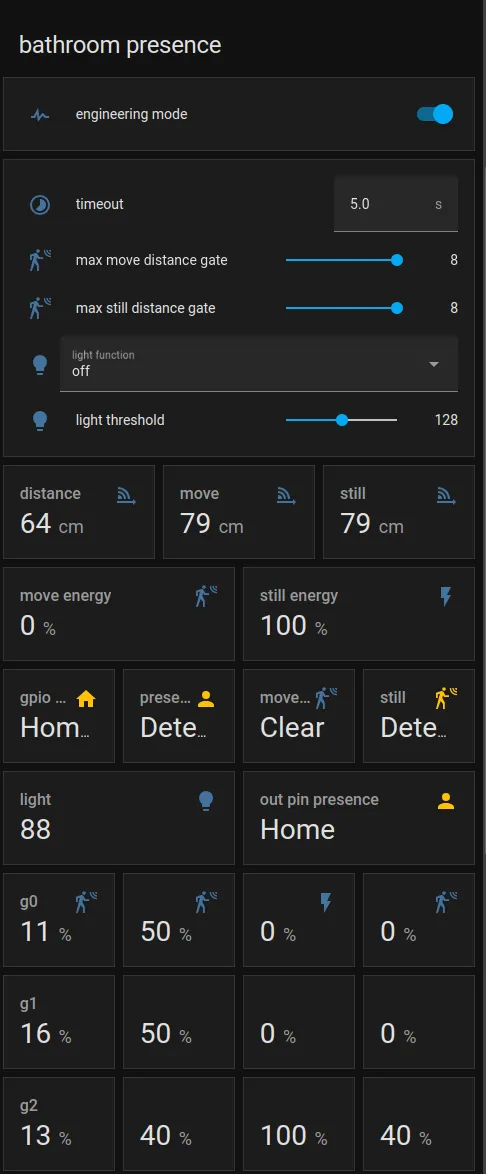
Section titled “Home Assistant Card”For easy calibration process, you can use the following custom manual card.
type: vertical-stacktitle: 'DEVICE'cards: - type: horizontal-stack cards: - type: entities entities: - entity: 'switch.DEVICE_engineering_mode' name: engineering mode - type: vertical-stack cards: - type: entities entities: - entity: 'number.DEVICE_timeout' name: timeout - entity: 'number.DEVICE_max_move_distance_gate' name: max move distance gate - entity: 'number.DEVICE_max_still_distance_gate' name: max still distance gate - entity: 'select.DEVICE_light_function' name: light function - entity: 'number.DEVICE_light_threshold' name: light threshold - type: horizontal-stack cards: - type: entity entity: 'sensor.DEVICE_detection_distance' name: distance - type: entity entity: 'sensor.DEVICE_moving_distance' name: move - type: entity entity: 'sensor.DEVICE_still_distance' name: still - type: horizontal-stack cards: - type: entity entity: 'sensor.DEVICE_move_energy' name: move energy - type: entity entity: 'sensor.DEVICE_still_energy' name: still energy - type: horizontal-stack cards: - type: entity entity: 'binary_sensor.DEVICE_gpio_out_pin_presence_status' name: gpio presence state_color: true - type: entity entity: 'binary_sensor.DEVICE_presence' name: presence state_color: true - type: entity entity: 'binary_sensor.DEVICE_moving_target' name: movement state_color: true - type: entity entity: 'binary_sensor.DEVICE_still_target' name: still state_color: true - type: conditional conditions: - entity: 'switch.DEVICE_engineering_mode' state: 'on' card: type: vertical-stack cards: - type: horizontal-stack cards: - type: entity entity: 'sensor.DEVICE_light' name: light - type: entity entity: 'binary_sensor.DEVICE_out_pin_presence_status' name: out pin presence state_color: true - type: horizontal-stack cards: - type: entity entity: 'sensor.DEVICE_g0_move_energy' name: 'g0' - type: entity entity: 'number.DEVICE_g0_move_threshold' name: ' ' - type: entity entity: 'sensor.DEVICE_g0_still_energy' name: ' ' - type: entity entity: 'number.DEVICE_g0_still_threshold' name: ' ' - type: horizontal-stack cards: - type: entity entity: 'sensor.DEVICE_g1_move_energy' name: 'g1' icon: ' ' - type: entity entity: 'number.DEVICE_g1_move_threshold' name: ' ' icon: ' ' - type: entity entity: 'sensor.DEVICE_g1_still_energy' name: ' ' icon: ' ' - type: entity entity: 'number.DEVICE_g1_still_threshold' name: ' ' icon: ' ' - type: horizontal-stack cards: - type: entity entity: 'sensor.DEVICE_g2_move_energy' name: 'g2' icon: ' ' - type: entity entity: 'number.DEVICE_g2_move_threshold' name: ' ' icon: ' ' - type: entity entity: 'sensor.DEVICE_g2_still_energy' name: ' ' icon: ' ' - type: entity entity: 'number.DEVICE_g2_still_threshold' name: ' ' icon: ' ' - type: horizontal-stack cards: - type: entity entity: 'sensor.DEVICE_g3_move_energy' name: 'g3' icon: ' ' - type: entity entity: 'number.DEVICE_g3_move_threshold' name: ' ' icon: ' ' - type: entity entity: 'sensor.DEVICE_g3_still_energy' name: ' ' icon: ' ' - type: entity entity: 'number.DEVICE_g3_still_threshold' name: ' ' icon: ' ' - type: horizontal-stack cards: - type: entity entity: 'sensor.DEVICE_g4_move_energy' name: 'g4' icon: ' ' - type: entity entity: 'number.DEVICE_g4_move_threshold' name: ' ' icon: ' ' - type: entity entity: 'sensor.DEVICE_g4_still_energy' name: ' ' icon: ' ' - type: entity entity: 'number.DEVICE_g4_still_threshold' name: ' ' icon: ' ' - type: horizontal-stack cards: - type: entity entity: 'sensor.DEVICE_g5_move_energy' name: 'g5' icon: ' ' - type: entity entity: 'number.DEVICE_g5_move_threshold' name: ' ' icon: ' ' - type: entity entity: 'sensor.DEVICE_g5_still_energy' name: ' ' icon: ' ' - type: entity entity: 'number.DEVICE_g5_still_threshold' name: ' ' icon: ' ' - type: horizontal-stack cards: - type: entity entity: 'sensor.DEVICE_g6_move_energy' name: 'g6' icon: ' ' - type: entity entity: 'number.DEVICE_g6_move_threshold' name: ' ' icon: ' ' - type: entity entity: 'sensor.DEVICE_g6_still_energy' name: ' ' icon: ' ' - type: entity entity: 'number.DEVICE_g6_still_threshold' name: ' ' icon: ' ' - type: horizontal-stack cards: - type: entity entity: 'sensor.DEVICE_g7_move_energy' name: 'g7' icon: ' ' - type: entity entity: 'number.DEVICE_g7_move_threshold' name: ' ' icon: ' ' - type: entity entity: 'sensor.DEVICE_g7_still_energy' name: ' ' icon: ' ' - type: entity entity: 'number.DEVICE_g7_still_threshold' name: ' ' icon: ' ' - type: horizontal-stack cards: - type: entity entity: 'sensor.DEVICE_g8_move_energy' name: 'g8' icon: ' ' - type: entity entity: 'number.DEVICE_g8_move_threshold' name: ' ' icon: ' ' - type: entity entity: 'sensor.DEVICE_g8_still_energy' name: ' ' icon: ' ' - type: entity entity: 'number.DEVICE_g8_still_threshold' name: ' ' icon: ' 'Then replace all instances of DEVICE with your device name
The result: