

LD2450 Sensor
Component
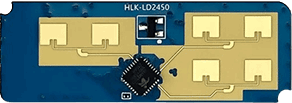
Section titled “Component”The ld2450 component allows you to use the HLK-LD2450 human
presence, motion detection and tracking radar module with ESPHome.
Target tracking involves real-time tracking of the position of a (moving) target within a specific area, enabling measurement of the target’s distance, angle and speed (relative to the sensor).
The LD2450 is a sensor module for motion target tracking within the Hi-link 24G millimeter-wave radar series. This module features simplified 24 GHz radar sensor hardware and intelligent algorithm firmware. It’s primarily intended for use indoors to enable the location tracking of moving human targets.
HLK-LD2450 official data sheet and user manuals
NOTE
Ensure that the LD2450 firmware version is V2.02.23090617 or later for proper integration functionality. You
can use the HLKRadarTool mobile app to update the firmware.
The UART is required to be set up in your configuration for this sensor to work, parity and
stop_bits must be respectively NONE and 1. Use of hardware a UART is highly recommended in order to
properly support the default 256000 baud rate of the LD2450 module.
# ld2450 configurationld2450: id: ld2450_radarConfiguration variables
Section titled “Configuration variables”- id (Optional, ID): Manually specify the ID for this Ld2450 component.
- uart_id (Optional, ID): Manually specify the ID of the UART Component to use. Required if you have multiple UARTs configured.
- on_data (Optional, Automation): An automation to perform after each report is received. All target values are guaranteed to be up-to-date and consistent.
Binary Sensor
Section titled “Binary Sensor”The ld2450 binary sensor offers presence states for the targets.
binary_sensor: - platform: ld2450 ld2450_id: ld2450_radar has_target: name: Presence has_moving_target: name: Moving Target has_still_target: name: Still TargetConfiguration variables
Section titled “Configuration variables”-
ld2450_id (Optional, ID): Manually specify the ID for the Ld2450 component.
-
has_target (Optional): True if either target is still or in movement. All options from Binary Sensor.
-
has_moving_target (Optional): True if a moving target is detected. All options from Binary Sensor.
-
has_still_target (Optional): True if a still target is detected. All options from Binary Sensor.
NOTE
By default, each of the Binary Sensor components above includes the following filter by default to prevent flooding Home Assistant with state updates:
- settle: 1000msIf you have defined other filters, this default will be overridden; you may of course add it back to your custom filter(s) as above if you wish.
To remove the default filter for any given binary sensor instance, add filters: [] to its configuration.
Sensor
Section titled “Sensor”The ld2450 sensor provides you with information about the states and attributes of detected targets.
sensor: - platform: ld2450 ld2450_id: ld2450_radar target_count: name: Presence Target Count still_target_count: name: Still Target Count moving_target_count: name: Moving Target Count target_1: x: name: Target-1 X y: name: Target-1 Y speed: name: Target-1 Speed angle: name: Target-1 Angle distance: name: Target-1 Distance resolution: name: Target-1 Resolution target_2: x: name: Target-2 X y: name: Target-2 Y speed: name: Target-2 Speed angle: name: Target-2 Angle distance: name: Target-2 Distance resolution: name: Target-2 Resolution target_3: x: name: Target-3 X y: name: Target-3 Y speed: name: Target-3 Speed angle: name: Target-3 Angle distance: name: Target-3 Distance resolution: name: Target-3 Resolution zone_1: target_count: name: Zone-1 All Target Count still_target_count: name: Zone-1 Still Target Count moving_target_count: name: Zone-1 Moving Target Count zone_2: target_count: name: Zone-2 All Target Count still_target_count: name: Zone-2 Still Target Count moving_target_count: name: Zone-2 Moving Target Count zone_3: target_count: name: Zone-3 All Target Count still_target_count: name: Zone-3 Still Target Count moving_target_count: name: Zone-3 Moving Target CountConfiguration variables
Section titled “Configuration variables”-
ld2450_id (Optional, ID): Manually specify the ID for the Ld2450 component.
-
target_count (Optional, int): Total targets detected, whether they are stationary or in motion. All options from Sensor.
-
still_target_count (Optional, int): Count of stationary targets. All options from Sensor.
-
moving_target_count (Optional, int): Count of moving targets. All options from Sensor.
-
target_N (Optional): Details about the targets (N = 1 to 3). A maximum of 3 targets can be detected:
target_1,target_2,target_3.-
x (Optional, int): Distance in
millimeter (mm)of the target from theld2450sensor along theX-axis (negative for left side of the sensor, positive for right side of the sensor). The
ld2450module can detect targets from -3000 to 3000 mm inXdirection. All options from Sensor. -
y (Optional, int): Distance in
millimeter (mm)of the target from theld2450sensor in the Ydirection (near/far). The
ld2450module can detect targets from 0 to 6000 mm inYdirection. All options from Sensor. -
speed (Optional, int): Speed of the moving target in
mm/s.All options from Sensor.
-
angle (Optional, int): Angle of target in
degrees (°)relative to theld2450sensor.All options from Sensor.
-
distance (Optional, int): Distance in
millimeter (mm)of the target from theld2450sensor alongthe X-axis (negative for left side of the sensor, positive for right side of the sensor). All options from Sensor.
-
resolution (Optional, int): The
ld2450target detection range resolution inmillimeter (mm).All options from Sensor.
-
-
zone_N (Optional): Target count details in the defined zones (N = 1 to 3). A maximum of three zones:
zone_1,zone_2,zone_3.-
target_count (Optional, int): Total targets detected in the zone, whether they are stationary or in motion.
All options from Sensor.
-
still_target_count (Optional, int): Count of stationary targets in the zone. All options from
-
moving_target_count (Optional, int): Count of moving targets in the zone. All options from
-
NOTE
By default, each of the Sensor components above includes the following filters by default to prevent flooding Home Assistant with state updates:
- timeout: timeout: 1s value: last- throttle_with_priority: 1000msIf you have defined other filters, this default will be overridden; you may of course add it back to your custom filter(s) as above if you wish.
To remove the default filters for any given sensor instance, add filters: [] to its configuration.
Switch
Section titled “Switch”The ld2450 switch allows you to control your Ld2450 Bluetooth and Multi/Single Target Tracking.
switch: - platform: ld2450 ld2450_id: ld2450_radar bluetooth: name: "Bluetooth" multi_target: name: "Multi Target Tracking"Configuration variables
Section titled “Configuration variables”-
ld2450_id (Optional, ID): Manually specify the ID for the Ld2450 component if you are using multiple components.
-
bluetooth (Optional): Turn on/off the bluetooth adapter. Defaults to
true. All options from Switch. -
multi_target (Optional): Turn on/off the Multi Target Tracking option. The initial state set based on the corresponding setting as read from LD2450 module at boot. All options from Switch.
Number
Section titled “Number”The ld2450 number platform allows you to control the presence timeout and zone area configuration of your
Ld2450.
number: - platform: ld2450 ld2450_id: ld2450_radar presence_timeout: name: "Timeout" zone_1: x1: name: Zone-1 X1 y1: name: Zone-1 Y1 x2: name: Zone-1 X2 y2: name: Zone-1 Y2 zone_2: x1: name: Zone-2 X1 y1: name: Zone-2 Y1 x2: name: Zone-2 X2 y2: name: Zone-2 Y2 zone_3: x1: name: Zone-3 X1 y1: name: Zone-3 Y1 x2: name: Zone-3 X2 y2: name: Zone-3 Y2Configuration variables
Section titled “Configuration variables”- ld2450_id (Optional, ID): Manually specify the ID for the Ld2450 component.
- presence_timeout (Required, int): The duration, in seconds, for which the
presence states will persist even after the detection is cleared. Default is
5seconds. All options from Number.
NOTE
The presence_timeout value applies only to the presence binary sensor states.
It does not apply to any other sensor data, such as target count or target details.
-
zone_N (Optional): Configuration for the zone (N = 1 to 3), defined as a rectangular area in front of and relative to the sensor. A maximum of three zones can be configured:
zone_1,zone_2,zone_3. The zone coordinates consist ofx1,y1(near-left) tox2,y2(far-right) and are specified in millimeters (mm).-
x1 (Required, int): Start X coordinate of the zone along the X-axis. Range is from -3000 (far left) to 3000
(far right). All options from Number.
-
y1 (Required, int): Start Y coordinate of the zone along the Y-axis. Range is 0 (closest) to 6000
(furthest). All options from Number.
-
x2 (Required, int): End X coordinate of the zone along the X-axis. Range is from -3000 (far left) to 3000
(far right). All options from Number.
-
y2 (Required, int): End Y coordinate of the zone along the Y-axis. Range is 0 (closest) to 6000
(furthest). All options from Number.
-
Button
Section titled “Button”The ld2450 button allows you to perform restart and factory reset actions on your Ld2450.
button: - platform: ld2450 ld2450_id: ld2450_radar factory_reset: name: "LD2450 Factory Reset" restart: name: "LD2450 Restart"Configuration variables
Section titled “Configuration variables”-
ld2450_id (Optional, ID): Manually specify the ID for the Ld2450 component.
-
factory_reset (Optional): Resets the
ld2450to its factory default configuration/values. All options from Button. -
restart (Optional): Restart the
ld2450device. All options from Button.
Text Sensor
Section titled “Text Sensor”The ld2450 text sensor allows you to get information about your Ld2450.
text_sensor: - platform: ld2450 ld2450_id: ld2450_radar version: name: "LD2450 Firmware" mac_address: name: "LD2450 BT MAC" target_1: direction: name: "Target-1 Direction" target_2: direction: name: "Target-2 Direction" target_3: direction: name: "Target-3 Direction"Configuration variables
Section titled “Configuration variables”-
ld2450_id (Optional, ID): Manually specify the ID for the Ld2450 component.
-
version (Optional): The
ld2450firmware version. All options from Text Sensor. -
mac_address (Optional): The
ld2450Bluetooth MAC address. All options from Text Sensor. -
target_N (Optional): Targets (N = 1 to 3). A maximum of 3 targets can be detected:
target_1,target_2,target_3.-
direction (Optional): Direction of the target relative to the
ld2450sensor. Possible values are:Stationary,Moving away,Approaching,NA. All options from Sensor.
-
Select
Section titled “Select”The ld2450 select allows you to control baud rate and zone type of your Ld2450.
select: - platform: ld2450 ld2450_id: ld2450_radar baud_rate: name: "Baud rate" zone_type: name: "Zone Type"Configuration variables
Section titled “Configuration variables”-
ld2450_id (Optional, ID): Manually specify the ID for the Ld2450 component.
-
baud_rate (Optional): Control the UART serial port baud rate. Defaults to
256000. Once changed, all sensors will stop working until a fresh install with an updated UART Component configuration. All options from Select. -
zone_type (Optional): Control the zone detection modes. It can be set to
Disabled,DetectionorFilter. Selecting theDisabledoption will disable zone area detection.Detectionmode is used to detect only targets in the specified area, whileFiltermode can be used to exclude an area from detection. All options from Select.
Example configuration
Section titled “Example configuration”Here is the complete example configuration for Ld2450.
esphome:  name: ld2450-radar  friendly_name: ld2450-radar
esp32:  board: wemos_d1_mini32
logger:
api:
ota:  - platform: esphome
wifi:  ap:
uart:  id: uart_ld2450  tx_pin: GPIOXX  rx_pin: GPIOXX  baud_rate: 256000  parity: NONE  stop_bits: 1
ld2450:  id: ld2450_radar  uart_id: uart_ld2450
binary_sensor:  - platform: ld2450    ld2450_id: ld2450_radar    has_target:      name: Presence    has_moving_target:      name: Moving Target    has_still_target:      name: Still Target
number:  - platform: ld2450    ld2450_id: ld2450_radar    presence_timeout:      name: "Timeout"    zone_1:      x1:        name: Zone-1 X1      y1:        name: Zone-1 Y1      x2:        name: Zone-1 X2      y2:        name: Zone-1 Y2    zone_2:      x1:        name: Zone-2 X1      y1:        name: Zone-2 Y1      x2:        name: Zone-2 X2      y2:        name: Zone-2 Y2    zone_3:      x1:        name: Zone-3 X1      y1:        name: Zone-3 Y1      x2:        name: Zone-3 X2      y2:        name: Zone-3 Y2
switch:  - platform: ld2450    ld2450_id: ld2450_radar    bluetooth:      name: "Bluetooth"    multi_target:      name: "Multi Target Tracking"
select:  - platform: ld2450    ld2450_id: ld2450_radar    baud_rate:      name: "Baud rate"    zone_type:      name: "Zone Type"
button:  - platform: ld2450    ld2450_id: ld2450_radar    factory_reset:      name: "LD2450 Factory Reset"      entity_category: "config"    restart:      name: "LD2450 Restart"      entity_category: "config"
text_sensor:  - platform: ld2450    ld2450_id: ld2450_radar    version:      name: "LD2450 Firmware"    mac_address:      name: "LD2450 BT MAC"    target_1:      direction:        name: "Target-1 Direction"    target_2:      direction:        name: "Target-2 Direction"    target_3:      direction:        name: "Target-3 Direction"
sensor:  - platform: ld2450    ld2450_id: ld2450_radar    target_count:      name: Presence Target Count  - platform: ld2450    ld2450_id: ld2450_radar    still_target_count:      name: Still Target Count  - platform: ld2450    ld2450_id: ld2450_radar    moving_target_count:      name: Moving Target Count  - platform: ld2450    ld2450_id: ld2450_radar    target_1:      x:        name: Target-1 X      y:        name: Target-1 Y      speed:        name: Target-1 Speed      angle:        name: Target-1 Angle      distance:        name: Target-1 Distance      resolution:        name: Target-1 Resolution    target_2:      x:        name: Target-2 X      y:        name: Target-2 Y      speed:        name: Target-2 Speed      angle:        name: Target-2 Angle      distance:        name: Target-2 Distance      resolution:        name: Target-2 Resolution    target_3:      x:        name: Target-3 X      y:        name: Target-3 Y      speed:        name: Target-3 Speed      angle:        name: Target-3 Angle      distance:        name: Target-3 Distance      resolution:        name: Target-3 Resolution    zone_1:      target_count:        name: Zone-1 All Target Count      still_target_count:        name: Zone-1 Still Target Count      moving_target_count:        name: Zone-1 Moving Target Count    zone_2:      target_count:        name: Zone-2 All Target Count      still_target_count:        name: Zone-2 Still Target Count      moving_target_count:        name: Zone-2 Moving Target Count    zone_3:      target_count:        name: Zone-3 All Target Count      still_target_count:        name: Zone-3 Still Target Count      moving_target_count:        name: Zone-3 Moving Target Count