

MSA301 and MSA311 Sensors
Component/Hub
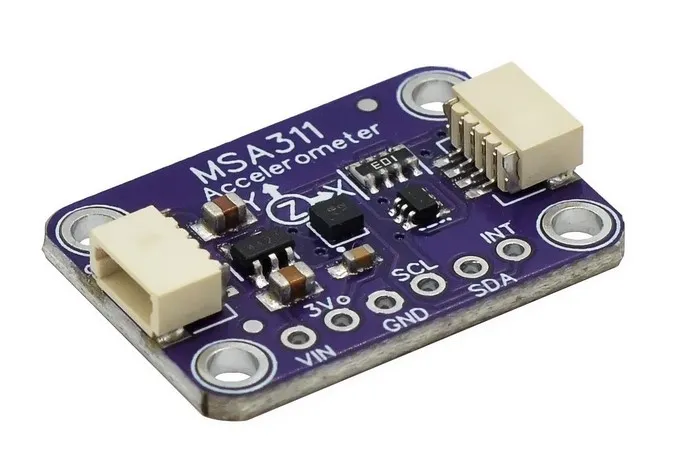
Section titled “Component/Hub”The msa3xx sensor platform allows you to use your MSA301 and MSA311 tri-axial,
low-g accelerometers (datasheet)
with ESPHome. The I²C is required to be set up in your configuration for this sensor to work.
MSA301 and MSA311 are almost identical sensors. The only difference is the ADC resolution. MSA311 has fixed 12-bits resolution while MSA301 ADC is 14-bits and it can be configured to do 8, 10, 12, or 14 bits measurements.
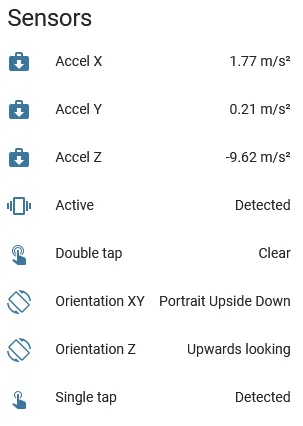
This component provides acceleration data in m/s², orientation information, and tap detection. XYZ axes can be calibrated and transformed to match the physical orientation of the sensor.
# Example configuration entrymsa3xx: type: msa301 range: 4G resolution: 12 update_interval: 10sConfiguration variables
Section titled “Configuration variables”The configuration is made up of three parts: The central component, acceleration sensors, text sensors with orientation information, and binary sensors for taps and movement detection.
Base Configuration:
-
type (Required, string): Sensor type. Either
msa301ormsa311. -
update_interval (Optional, Time): The interval for updating acceleration sensors. Defaults to
10s. -
range (Optional, string): The range of the sensor measurements. One of
2G,4G,8G,16G. Defaults to2Gwhich means it picks up accelerations between-2gand2g. -
resolution (Optional, int): The ADC resolution of the sensor in bits. Supported values for
msa301are8,10,12,14(default). Formsa311the only resolution supported is12(and it is default). -
calibration (Optional):
- offset_x (Optional, float): X-axis zero position calibration, in m/s². From -4.5 to 4.5. Defaults to
0. - offset_y (Optional, float): Y-axis zero position calibration, in m/s². From -4.5 to 4.5. Defaults to
0. - offset_z (Optional, float): Z-axis zero position calibration, in m/s². From -4.5 to 4.5. Defaults to
0.
- offset_x (Optional, float): X-axis zero position calibration, in m/s². From -4.5 to 4.5. Defaults to
-
transform (Optional):
- mirror_x (Optional, boolean): Mirror X-axis. Defaults to
false. - mirror_y (Optional, boolean): Mirror Y-axis. Defaults to
false. - mirror_z (Optional, boolean): Mirror Z-axis. Defaults to
false. - swap_xy (Optional, boolean): Swap X and Y axis. Defaults to
false.
- mirror_x (Optional, boolean): Mirror X-axis. Defaults to
Binary Sensor
Section titled “Binary Sensor”Three binary sensors available for use. Internal 500 ms debounce is applied for all sensors. For every sensor name is required. All other options from Binary Sensor. Shorthand notation also can be used.
binary_sensor: - platform: msa3xx tap: Single tap # shorthand notation for the sensor double_tap: Double tap # -- "" -- active: # regular notation for the sensor to be able name: Active # to use filters and other options filters: - delayed_off: 5000ms # example of prolongation of movement detection signalConfiguration variables
Section titled “Configuration variables”- tap (Optional): Single tap detection.
- double_tap (Optional): Double tap detection.
- active (Optional): Movement detection.
Sensor
Section titled “Sensor”Acceleration data is available through sensors configuration.
You can use shorthand notation like acceleration_x: "Acceleration X" or use regular notation. For
regular notation only the name is required. All options from Sensor.
sensor: - platform: msa3xx acceleration_x: Accel X acceleration_y: Accel Y acceleration_z: Accel ZConfiguration variables
Section titled “Configuration variables”- acceleration_x (Optional): X-axis acceleration, m/s².
- acceleration_y (Optional): Y-axis acceleration, m/s².
- acceleration_Z (Optional): Z-axis acceleration, m/s².
Text Sensor
Section titled “Text Sensor”Text sensor provides orientation information. You can use shorthand notation like
orientation_xy: "Orientation XY" or use regular notation.
text_sensor: - platform: msa3xx orientation_xy: Orientation XY orientation_z: Orientation ZConfiguration variables
Section titled “Configuration variables”-
orientation_xy (Optional): XY orientation. Can be one of
Portrait Upright,Portrait Upside Down,Landscape Left,Landscape Right. -
orientation_z (Optional): Z orientation. Can be one of
Upwards looking,Downwards looking
Automations
Section titled “Automations”on_tap trigger
Section titled “on_tap trigger”This automation will be triggered when single tap is detected.
msa3xx: type: msa301 # ... on_tap: - then: - logger.log: "Tapped"on_double_tap trigger
Section titled “on_double_tap trigger”This automation will be triggered when double tap is detected.
msa3xx: type: msa301 # ... on_double_tap: - then: - logger.log: "Double tapped"on_active trigger
Section titled “on_active trigger”This automation will be triggered when device detects changes in motion.
msa3xx: type: msa301 # ... on_active: - then: - logger.log: "Activity detected"on_orientation trigger
Section titled “on_orientation trigger”This automation will be triggered when device orientation is changed with respect to the gravitation field vector g.
msa3xx: type: msa301 # ... on_orientation: - then: - logger.log: "Orientation change detected"Using both MSA301 and MSA311 at the same time
Section titled “Using both MSA301 and MSA311 at the same time”Should you wish to use both sensors in the same configuration, you can do so by specifying ID for each sensor.
msa3xx:  - id: my_msa301_sensor    type: msa301    # ...  - id: my_msa311_sensor    type: msa311
sensor:  - platform: msa3xx    msa3xx_id: my_msa311_sensor    acceleration_x: Accel X    acceleration_y: Accel Y    acceleration_z: Accel Z
binary_sensor:  - platform: msa3xx    msa3xx_id: my_msa301_sensor    tap: Single tap