

Selec Energy Monitor
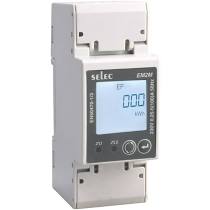
The selec_meter sensor platform allows you to use Selec Modbus energy monitors
(website)
with ESPHome.
The communication with this component is done via a UART using Modbus.
You must therefore have a uart: entry in your configuration with both the TX and RX pins set
to some pins on your board and the baud rate set to 9600.
# Example configuration entryuart:  rx_pin: D1  tx_pin: D2  baud_rate: 9600  stop_bits: 1
sensor:  - platform: selec_meter    total_active_energy:      name: "SelecEM2M Total Active Energy"    import_active_energy:      name: "SelecEM2M Import Active Energy"    export_active_energy:      name: "SelecEM2M Export Active Energy"    total_reactive_energy:      name: "SelecEM2M Total Reactive Energy"    import_reactive_energy:      name: "SelecEM2M Import Reactive Energy"    export_reactive_energy:      name: "SelecEM2M Export Reactive Energy"    apparent_energy:      name: "SelecEM2M Apparent Energy"    active_power:      name: "SelecEM2M Active Power"    reactive_power:      name: "SelecEM2M Reactive Power"    apparent_power:      name: "SelecEM2M Apparent Power"    voltage:      name: "SelecEM2M Voltage"    current:      name: "SelecEM2M Current"    power_factor:      name: "SelecEM2M Power Factor"    frequency:      name: "SelecEM2M Frequency"    maximum_demand_active_power:      name: "SelecEM2M Maximum Demand Active Power"    maximum_demand_reactive_power:      name: "SelecEM2M Maximum Demand Reactive Power"    maximum_demand_apparent_power:      name: "SelecEM2M Maximum Demand Apparent Power"
Configuration variables
Section titled “Configuration variables”-
total_active_energy (Optional): Use the total active energy value of the sensor in kilo watt hours. All options from Sensor.
-
import_active_energy (Optional): Use the import active energy value of the sensor in kilo watt hours. All options from Sensor.
-
export_active_energy (Optional): Use the export active energy value of the sensor in kilo watt hours. All options from Sensor.
-
total_reactive_energy (Optional): Use the total reactive energy value of the sensor in kilo volt amps reactive hours. All options from Sensor.
-
import_reactive_energy (Optional): Use the import reactive energy value of the sensor in kilo volt amps reactive hours. All options from Sensor.
-
export_reactive_energy (Optional): Use the export reactive energy value of the sensor in kilo volt amps reactive hours. All options from Sensor.
-
apparent_energy (Optional): Use the apparent energy value of the sensor in kilo volt amps hours. All options from Sensor.
-
active_power (Optional): Use the (active) power value of the sensor in watts. All options from Sensor.
-
reactive_power (Optional): Use the reactive power value of the sensor in VAR. All options from Sensor.
-
apparent_power (Optional): Use the apparent power value of the sensor in VA. All options from Sensor.
-
voltage (Optional): Use the voltage value of the sensor in volts. All options from Sensor.
-
current (Optional): Use the current value of the sensor in amperes. All options from Sensor.
-
power_factor (Optional): Use the power factor value of the sensor. All options from Sensor.
-
frequency (Optional): Use the frequency value of the sensor in hertz. All options from Sensor.
-
maximum_demand_active_power (Optional): Use the maximum demand (active) power value of the sensor in watts. All options from Sensor.
-
maximum_demand_reactive_power (Optional): Use the maximum demand reactive power value of the sensor in VAR. All options from Sensor.
-
maximum_demand_apparent_power (Optional): Use the maximum demand apparent power value of the sensor in VA. All options from Sensor.
-
update_interval (Optional, Time): The interval to check the sensor. Defaults to
60s. -
address (Optional, int): The address of the sensor if multiple sensors are attached to the same UART bus. You will need to set the address of each device manually. Defaults to
1.