

gt911 Touch Screen Controller
The gt911 touchscreen platform allows using the touch screen controllers based on the gt911 chip with ESPHome.
The I²C is required to be set up in your configuration for this touchscreen to work.
This controller is used in the Espressif ESP32-S3-BOX-3 and the m5paper;
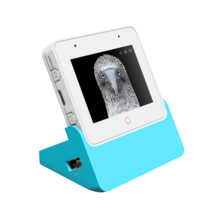
Base Touchscreen Configuration
Section titled “Base Touchscreen Configuration”# Example configuration entrytouchscreen: platform: gt911 id: my_touchscreen interrupt_pin: GPIOXXConfiguration variables
Section titled “Configuration variables”-
id (Optional, ID): Manually set the ID of this touchscreen.
-
interrupt_pin (Optional, Pin Schema): The touch detection pin.
-
reset_pin (Optional, Pin Schema): The reset pin.
-
All other options from Touchscreen.
Binary Sensor
Section titled “Binary Sensor”In addition to touch areas on the screen configured through the Touchscreen component, the gt911 supports up to four buttons located outside of the normal touchscreen area. On the ESP32-S3-BOX-3 the red circle below the display is such a button. A binary sensor can be configured to react to touching these buttons.
# Example configuration entrybinary_sensor: - platform: gt911 name: "Home" index: 0Configuration variables
Section titled “Configuration variables”-
gt911_id (Optional, ID): Manually specify the ID of the touchscreen.
-
index (Optional, int): Internal index of the touch button, between 0 and 3. The default is 0.
-
All other options from Binary Sensor.